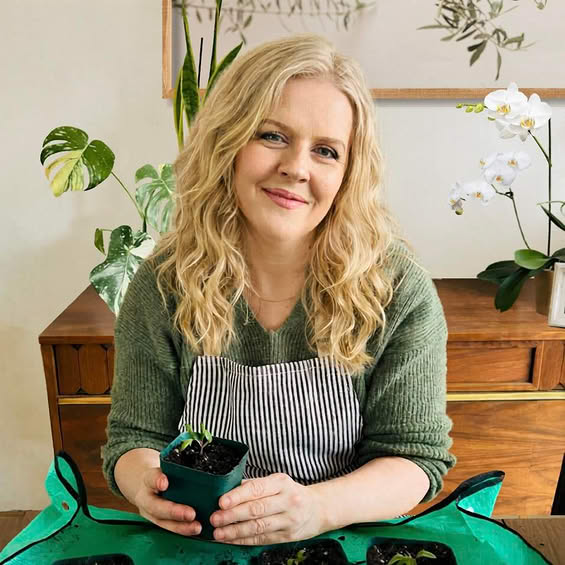
Built by Amanda Holt
Grow your own groceries.
Plan every bed for spring, summer and fall, with planting dates for your city.
Choose what you want to grow. GrowSmart plans your beds, schedules your plantings, and remembers your garden year after year.



Free to start. No account needed.
Or use it in your browserPlanting dates for your city · Smart bed layouts · AI garden assistant
Built in Ontario by a Canadian gardener.
Try the app
This is the real app with a sample garden in Thunder Bay, Ontario. Explore freely. Nothing is saved.
Why gardeners switch
Your plants, not a short list.
Over 250 vegetables, herbs, fruit and flowers, including garlic, strawberries and tomatillos. Can't find yours? Add it and GrowSmart schedules it.
Timed for where you actually garden.
In Canada and the US, dates come from the weather stations nearest you. Built in Ontario, in °C or °F.
Try it properly before you pay.
Start free with up to 10 plants. No account, no email, no card. Fall garlic is included.
See the whole season at once.
Every sow, transplant and harvest window on one timeline, across spring, summer and fall.
Know what to do this week.
This Week gathers the tasks for your beds and your dates. Done watering the seedlings? One tap marks the whole group.
Your garden doesn't disappear.
It saves on your phone and works offline. Sign in for free and it syncs to every device.
Next year starts where this one ended.
GrowSmart remembers what grew in every square. Every season you save stays in History for free, and on Pro it warns you before you repeat a crop family.
New this season
What we added lately. Pro features are tagged.
- Garden centres near you. Local Resources lists nearby garden centres with hours and directions. Five centres in Ontario so far. Free
- Pots and grow bags in your units. Pick a grow bag from 1 to 30 gallons or type your own size, in inches or centimetres. Free
- One Items tray for bed elements. Place paths, soil cover, supports, covers and irrigation on a bed. Free Irrigation run times and the parts list are Pro
- A whole-yard map. Drag your beds, fruit trees and groves to where they really are, and get a warning before a tree shades a bed. Pro
- A walkthrough, and help inside the app. A four-step tour of Layout the first time you open it, and a "How do I use GrowSmart?" button in Sage that answers from the app's own guide. The button is free with a free account. Free
On the web app and Android today. The iPhone app gets each change with its next App Store update.
Take it to the garden
Plan on your phone. It works offline, right in the beds.
Meet Sage: Your AI Garden Assistant
Ask about timing, spacing, companions and what to do next, based on your actual garden.
Ask Sage Anything
Sage knows your frost dates, your zone, and your active plants. Ask about timing, spacing, companion planting, or anything growing-related.
Garden Layout Advice
Describe your space and Sage suggests what to plant where, factoring in companions, sun requirements, and succession timing.
Sage is included in the Pro + Sage bundle. 3 free Sage questions with a free account.
Your week, calculated for your city
No generic spring calendar. Your week reflects your city, your plants, and where you are in the season.
- ✓ Start tomatoes & peppers indoors
- ✓ Direct sow spinach and lettuce
- ✓ Transplant hardened-off brassicas
Dates for your own city, not a generic calendar.
Plan your whole garden, not just one bed
Beds drawn to scale, long in-ground rows, paths and supports, and a map of the whole yard.
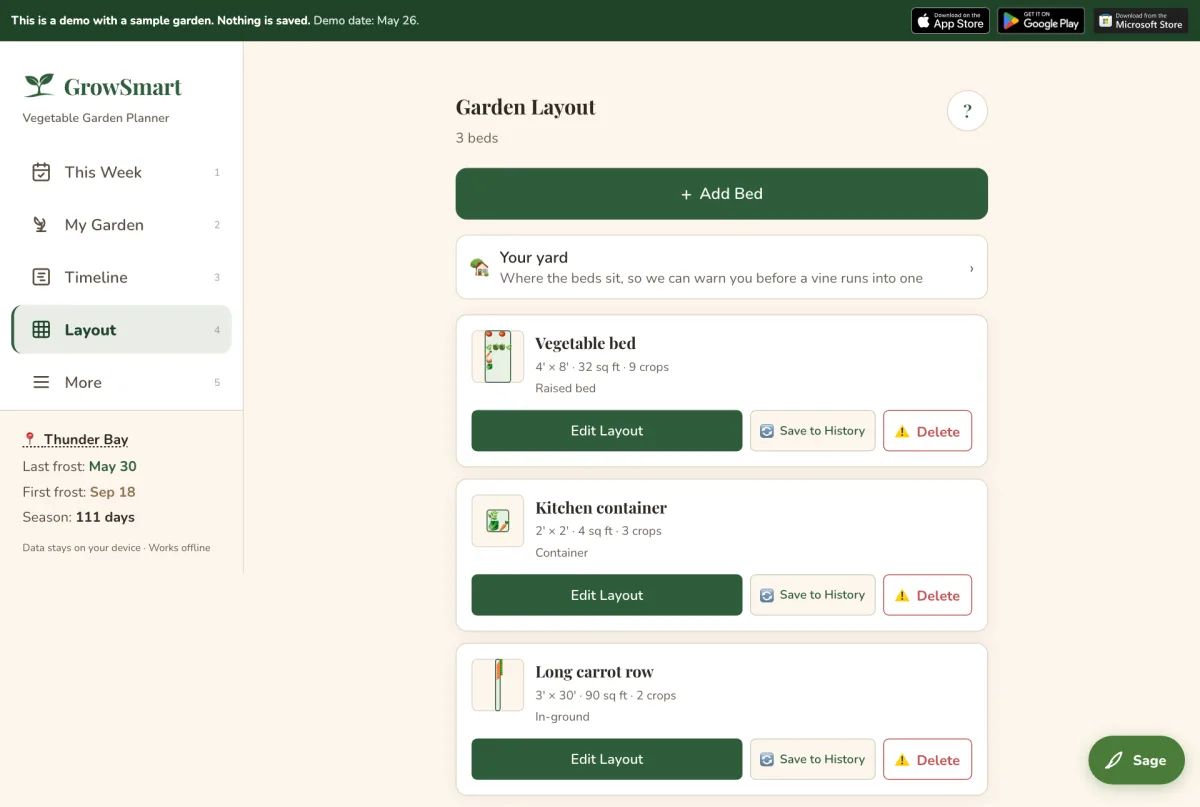
Beds drawn to scale
Raised beds, in-ground beds and containers sit side by side, each at its real size in feet or metres, with its crop count. This sample garden is in Thunder Bay, Ontario.
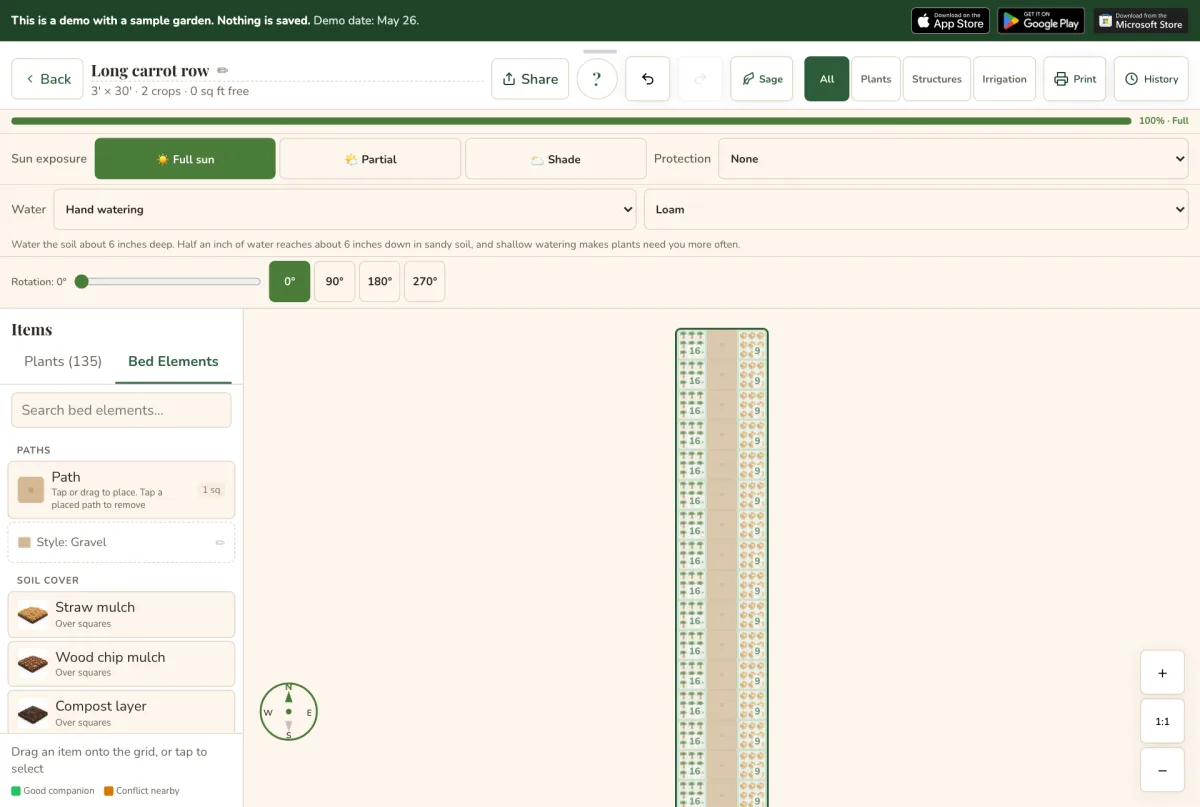
Long in-ground rows
An in-ground bed can run up to 50 feet (15 metres) on a side, so a long row is one long bed. This one is 3 by 30 feet: carrots, a gravel path, onions.
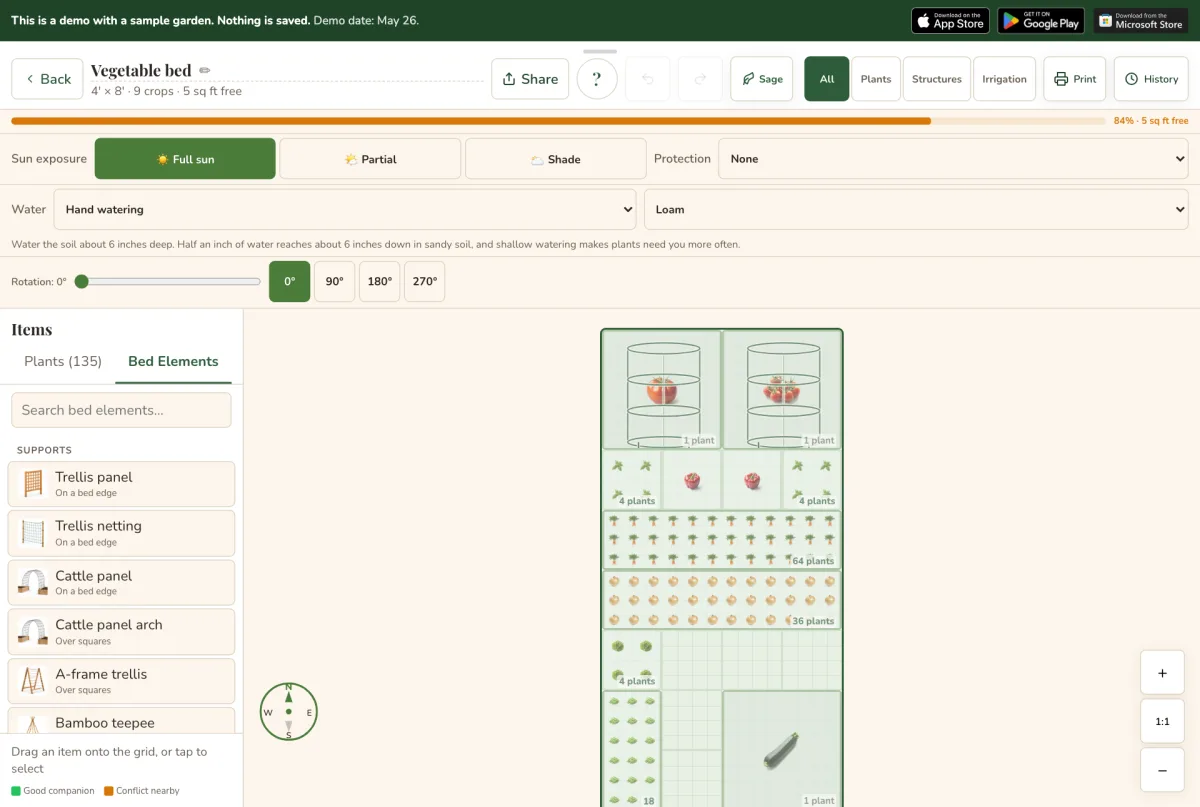
Paths and supports from Items Free
Open Items, then Bed Elements, to place paths, soil cover, supports (trellises, cages, stakes), covers and irrigation. Placing them is free. Irrigation run times and the parts list are Pro.
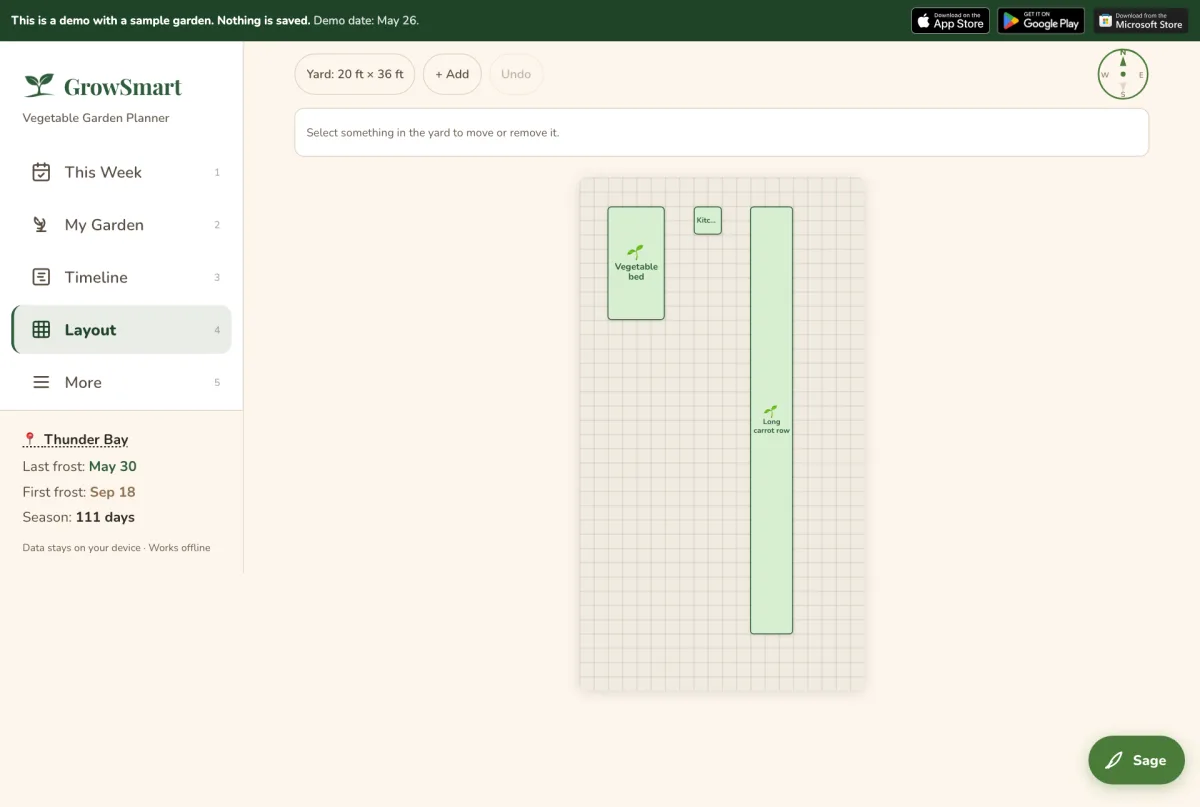
The whole-yard map Pro
Drag each bed to where it really is. Add fruit trees and groves to the same map, and GrowSmart warns you before a tree shades a bed. Pro also removes the one-bed limit.
What it can't do
- Beds are straight-sided rectangles, up to 50 feet or 15 metres per side. There are no curved or irregular shapes.
- The yard map, trees and groves, and unlimited beds are Pro. The free plan has one bed.
- It does not rate how much weight a trellis or cage can carry. We found no sourced numbers, so we make no claim.
- Sage never moves a bed on its own. Nothing changes until you tap Apply.
Screenshots are from the live app's demo garden. The iPhone app gets these features with its next App Store update.
Everything You Need to Grow More Food
For gardeners who want to do it right, whether it's your first raised bed or your fifth season.
Crop Rotation Memory
Year-over-year crop rotation from your own saved bed layouts. GrowSmart remembers what grew in every square. Past seasons stay in History for free; the rotation check, which warns before you plant the same family there within two years, is Pro.
Rotation check: ProScheduling Built for Your Climate
Planting dates for your city, for spring, summer and fall. Selected warm cities use planting windows from university extension guides, and other cities use local frost dates. No more guessing when to plant tomatoes.
Spring free Summer and fall: ProCompanion Planting Guide
Companion planting guidance for 197 plants shows what grows well together and what to keep apart. With reasons, not just checkmarks.
Basic info free Full guidance: ProSuccession Planting
Stagger your plantings for continuous harvests. Get lettuce, beans, and radishes all season instead of one glut.
ProGet the App on iPhone, Android and Windows
Download GrowSmart from the App Store, Google Play or the Microsoft Store. It works offline, so you can check your schedule right in the garden.
Garden Layout Planner
Drag-and-drop bed builder with companion planting logic built in. Plan your space before you plant it.
One bed free Unlimited beds: ProSeedling Care Timeline
Stage-by-stage care from seed to transplant: watering, fertilizing, and pot-up reminders timed to your sow date.
Up & Growing in 3 Steps
From zero to a full planting schedule in under two minutes.
Set Up Your Garden
Select your country and city. We pull your frost dates automatically. Then tell us about your garden: raised beds, containers, orchard, greenhouse, herb pots, or all of the above.
Pick Your Plants
Browse over 250 vegetables, herbs, flowers, and fruits. Search by name or filter by category. We'll flag what grows in your zone and show companion planting info where we have it.
Get Your Schedule
A visual timeline shows every planting window: indoor starts, transplants, direct sow, and harvest dates, calculated from your frost dates. Spring, summer, and fall.
Get GrowSmart as an app
Install the native app on your phone, tablet, or desktop. Sign in and your plan comes with you, on every device. Prefer the browser? It runs at getgrowsmart.com/app with nothing to install.
Simple, Honest Pricing
Start free. Upgrade when you're ready to plan your full growing season.
Free
- Up to 10 plants
- The spring schedule, plus fall garlic and shallots
- One bed
- Basic companion info
- Past seasons saved in History
- Works on all devices
Pro
- Unlimited plants and beds
- Spring, summer & fall schedules
- Companion planting guidance (197 plants)
- Works on all devices
- Succession planting engine
- Whole-yard map, fruit trees and groves
- Crop rotation checks (History is free)
- Care & harvest tracking
No charge during the free month. Cancel at least a day before it ends and you pay nothing.
Pro + Sage
- Everything in Pro
- Sage AI garden assistant
- Personalized advice using your zone and frost dates
- Sage layout suggestions for your beds
- 50 Sage queries per month included
No charge during the free month. Cancel at least a day before it ends and you pay nothing.
The free plan has no time limit and needs no card. Pro is optional.
Already on Pro? Add Sage for $3 CAD / month or $20 CAD / year. Add Sage
Prefer an app? Download GrowSmart on your phone, tablet, or desktop. Sign in and your plan comes with you, on every device.
Prices in Canadian dollars. Charged via LemonSqueezy, GST/HST included where applicable.
Frequently Asked Questions
What zones and cities do you cover?
GrowSmart covers Canada (all 13 provinces and territories, zones 0b to 9a) and the US (all 50 states and DC, zones 3a to 12b), from major cities to small towns. A Canadian or US town that is not on our list gets frost dates from the weather stations nearest to it. Most cities get a schedule counted from their own frost dates. Selected warm cities in Florida, Texas, Arizona, California and Hawaii, such as Miami, Orlando, Tampa, Houston, Phoenix, Tucson, Los Angeles and San Diego, get planting windows from university extension guides instead. Nine US cities have neither: San Francisco, Oakland, Long Beach, Santa Ana, Anaheim, Irvine, Oxnard and Eureka in California, and Waimea on Hawaii island. They have no frost dates to count from and no extension table of their own, so GrowSmart shows them no schedule. The UK and Ireland have approximate frost dates for listed cities, and so does Western Europe including France, Germany, Spain, Italy, the Netherlands and Scandinavia. That is about 360 listed cities in all; a town that is not listed uses the nearest listed city within 150 km, or has no frost dates yet.
Where does the frost date data come from?
Canadian frost dates come from Environment Canada 1991 to 2020 climate normals and US frost dates from NOAA 1991 to 2020 normals, using the median of up to three nearby weather stations. Hardiness zones come from NRCan for Canada and the USDA for the US. Frost dates for the UK, Ireland and Western Europe are approximate figures for listed cities, not yet drawn from station records.
What's included in the free plan?
The free plan is: up to 10 plants, the spring schedule plus fall garlic and shallots, one bed. It also includes basic companion planting info, keeps every season you save in History, and works on all devices, including offline. No account required. Pro unlocks unlimited plants, unlimited beds, full three-season scheduling (spring, summer, and fall), succession planting, the crop rotation check, the full companion matrix, and care tracking.
Do I need to create an account?
No. You can start planning immediately. No sign-up, no email required. Your data saves locally on your device. You can also create a free account to save your garden across devices and unlock features like Sage AI.
Does GrowSmart work offline?
Yes. The GrowSmart app saves your schedule, plant data and care log on your device, so it works without an internet connection and you can check your planting dates right in the garden.
Can I plan my whole garden, with paths and long rows?
Yes, with limits. Beds can be raised, in-ground or container, each drawn to its real size. An in-ground bed can run up to 50 feet (15 metres) on a side, so a long row is one long bed, and you place paths, soil cover, supports, covers and irrigation from the Items tray. Pro adds a whole-yard map where you drag beds, fruit trees and groves to where they really are, and unlimited beds (the free plan has one). Beds are straight-sided rectangles, so there are no curves or irregular shapes.
How is this different from other garden planning apps?
GrowSmart gives you over 250 plants plus your own, planting dates from local weather stations in Canada and the US, spring, summer and fall planning on Pro, and a free plan (10 plants, one bed) with no account or card.
Free planting guides
A seed starting and fall planting calendar for your city, a companion planting chart and a succession planting guide.
No spam. CASL, CAN-SPAM & GDPR compliant. Privacy Policy